| elisp | ||
| fonts | ||
| images | ||
| .gitignore | ||
| init.el | ||
| KPStandard-theme.el | ||
| README.md | ||
| screenshot.png | ||


KP's Emacs Config
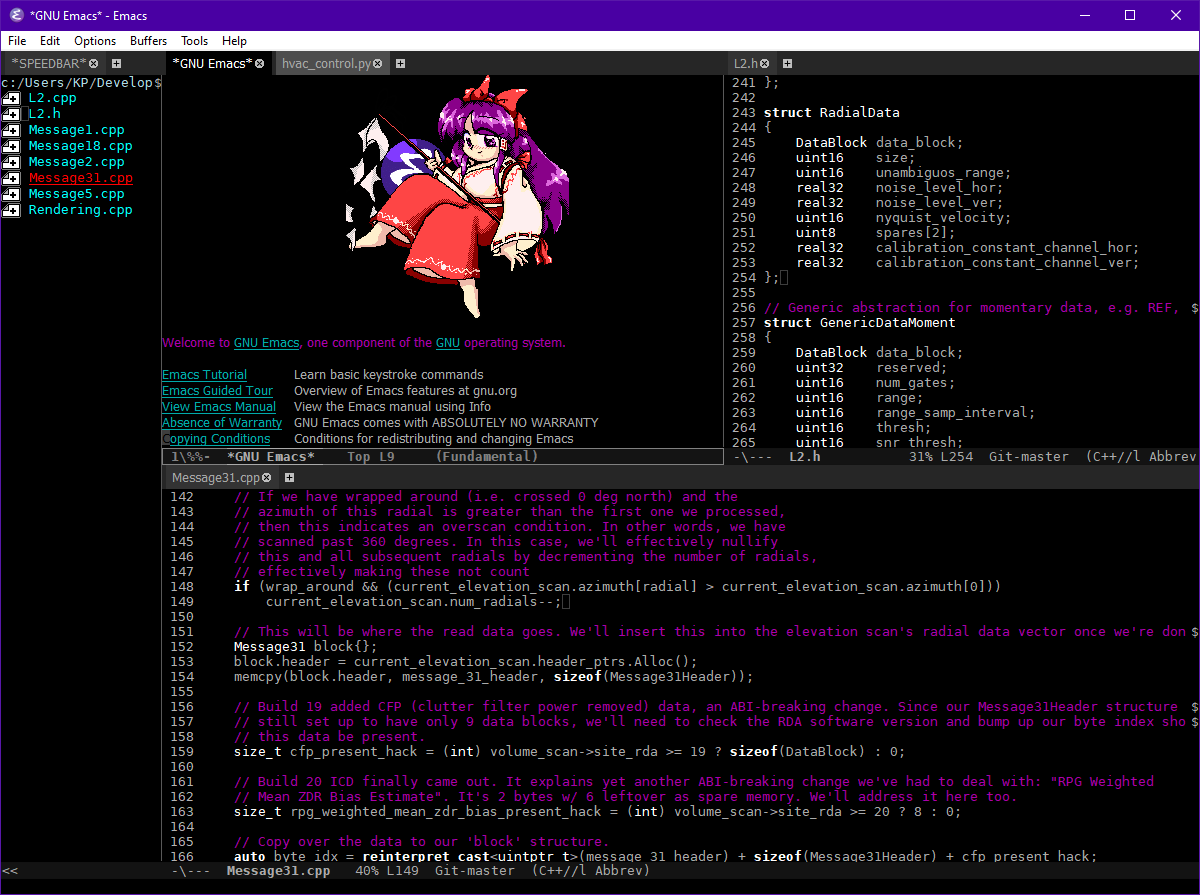
This is how I like to use Emacs. Everything's mostly stock but there's a few UX tweaks and language-specific things that make it more intuitive.
Background
I started using Emacs a few years ago after growing frustrated with JOE's lack of extensibility. Having used that editor for years I found the transition to Emacs a little rough, so this config was made to ease the growing pains.
Notable changes
- Redo+ used to replicate undo/redo behavior from JOE (
C-^to redo) - MWIM used to replicate traditional Home/End (or
C-a/C-e) behavior from other editors - sr-speedbar added to implement a sidebar (in the same frame) using the built-in "speedbar" feature
- web-mode added for better support for HTML, CSS, JS, PHP, etc.
- rust-mode added for Rust support
- kotlin-mode added for Kotlin support
- lua-mode added for Lua support
- glsl-mode added for GLSL support (along with some hacks to support bgfx's shader language)
- cmake-mode added for CMake support
- emmet-mode added for quicker HTML editing
perl-modereplaced withcperl-mode+ Perl syntax highlighting fixes- Delete word keybind from JOE added (
C-o) - Compilation shortcuts (
C-c bto compile,C-c rto recompile) - More intuitive keybinds for
tab-bar-mode(Emacs 27+) - Deleted text is no longer copied into the kill ring
- Emacs logo replaced w/ a cute Emacsified drawing of Reimu from Touhou Project
Installing and customizing
Just clone the repo from ~ (on a *nix) or %APPDATA% (on Windows) and you're all set.
The default theme is set to a custom one I've created w/ the font set to Bitstream Vera Mono as well as Tahoma for variable-width text. If you want to change this look for the region labeled "Visual stuff" and adjust accordingly.
If you want to change the startup logo you can also add/remove files via images/ which Emacs will randomly select from.
Windows setup
See my article Fixing Emacs on Windows for a quick guide on setting up Emacs to integrate into your system like any other text editor.
Note that some cosmetic stuff is applied based on whether or not it's running in a GUI. If Emacs is started as a daemon, initialization will act the same as if it were started from a terminal. So once a frame is available (i.e. a file is opened after starting the daemon), it may be necessary to reload the config with M-x load-file w/ the path to the init.el file.
Using tab-bar-mode
So in Emacs there's two ways of getting tabs in the editor: tab-line-mode (or global-tab-line-mode) and tab-bar-mode. The former is used to create tabs per window, while the latter creates tabs per frame. The former resembles how tabs works in other editors like Sublime Text, VSCode, etc. but the latter has its own use cases, e.g. if you're working on a bunch of projects at once and want to keep everything in the same frame.
tab-bar-mode is especially useful when you're using Emacs over SSH and want to replicate tmux windows. Prior to tab-bar-mode, the best way to do this was with the "register" system (C-x r j, C-x r w), which is 1) confusing to new users, 2) annoying because you have to name each register, and 3) gives you carpal tunnel.
With this config, the following keybinds are added for tab-bar-mode:
C-c tto enabletab-bar-modeC-c <up>to create a new tabC-c <down>to close the current tabC-c <left>to go to the tab left of the current oneC-c <right>to go to the tab right of the current one
In the future I'd like to introduce some for tab-line-mode as well, but in a terminal context I don't see them being as useful. Plus, I don't like the thought of hogging up too many C-c ... shortcuts as many major modes make extensive use of them. Perhaps we could implement them just like how they work for tab-bar-mode, with an extra C- prefix before the second key? Not sure... whatever.
Misc. tips
- To enable the sidebar:
M-x sr-speedbar-open - To toggle "show all files" in the sidebar:
M-x speedbar-toggle-show-all-files - To enable tabs:
M-x global-tab-line-mode
Remote editing on Windows
This section doesn't really have anything to do with my config specifically, but I figure I'd write about it here for other Windows users who don't feel like figuring this out:
PuTTY's supplemental utilities (Plink, Pageant, and PuTTYgen) can be used to easily and reliably connect to remote hosts in Emacs. Assuming these tools are in your PATH, and your SSH keys are active in Pageant, you can connect to a remote host with the following:
Open a file (C-x C-f) and specify a path like /plink:user@host:/home/user/foo and everything will "just work"; directories appear in the sidebar as you'd expect, and you can do M-x eshell to hop into a remote shell. With this method, I can pretty much do all of my work from one Emacs instance. Pretty neat!
Note: While this method is mostly jank-free, I've noticed that if you haven't approved the remote host keys prior to connection, Emacs will hang. If this happens, C-g to cancel connecting and manually connect to the host using plink.exe (or just ssh.exe) via command line, accept the host key when it asks, and try again. Once all the hosts you'll be connecting to are in known_hosts, this will no longer be an issue.
Why aren't you using use-package?
I don't like it.